How to Cancel AI Girlfriend Subscriptions (Every Platform)

So your digital sweetheart has run her course, eh? Maybe the tokens drained your wallet faster than a night out, or your AI waifu started repeating the same flirty lines. Now you want to cancel AI girlfriend subscriptions before the next billing date sneaks up and dings your card again.
Good news: most NSFW AI companion apps make it dead easy to bail, and you usually keep premium access until your cycle ends. Below is the rundown for every major platform, plus the App Store and Google Play routes that catch loads of blokes out.
👀 Why Blokes Cancel Their AI Girlfriend App
Before we get into the button-pushing, here's the real talk on why folks pull the plug on their virtual girlfriend:
Whatever your reason, killing the recurring payment is step one. Deleting your account (and your spicy chat logs) is a separate move we'll cover too.
💰 Cancel AI Girlfriend Subscriptions: The Quick Universal Method
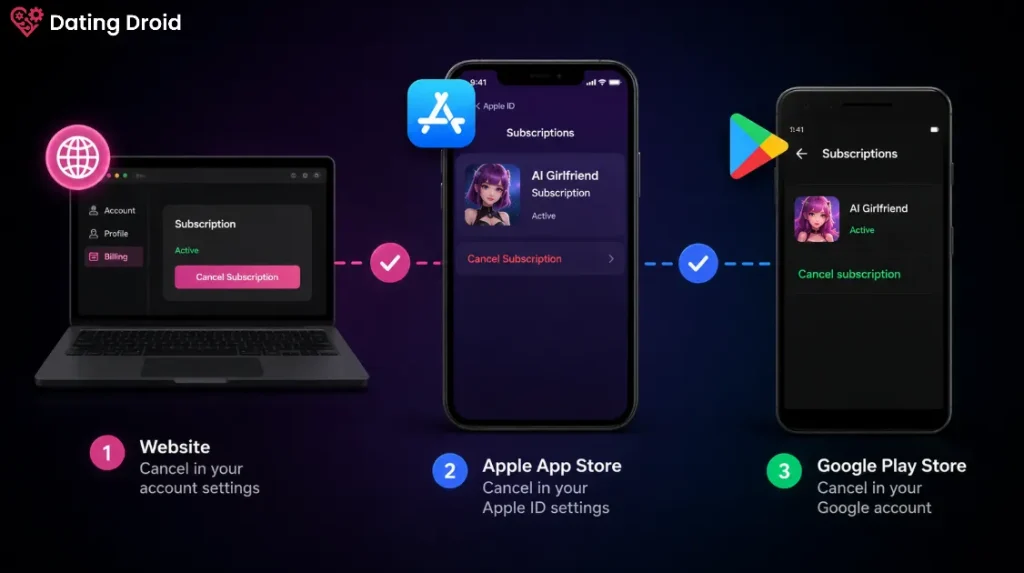
Here's the thing most people miss. How you cancel depends on where you paid. There are three payment routes, and you must cancel through the same one you signed up with:
- Directly on the website – Most NSFW AI girlfriend platforms bill you straight through their site. Cancel inside your profile or billing settings.
- Apple App Store – If you grabbed the app on iPhone, the subscription lives in your Apple ID, not the app.
- Google Play Store – Android downloads route billing through Google.
Cancel in the wrong spot and you'll keep getting charged. Sounds daft, but it's the number one reason people rage about “ghost charges” after they thought they'd quit.
✅ Platform-by-Platform Cancellation Steps
Right, let's get to the meat of it. Here's how to dump the most popular AI girlfriend apps, one by one.
Candy AI
Candy AI is one of the biggest virtual girlfriend platforms, run by EverAI Limited out of Malta, and billing shows as Everai on your statement.
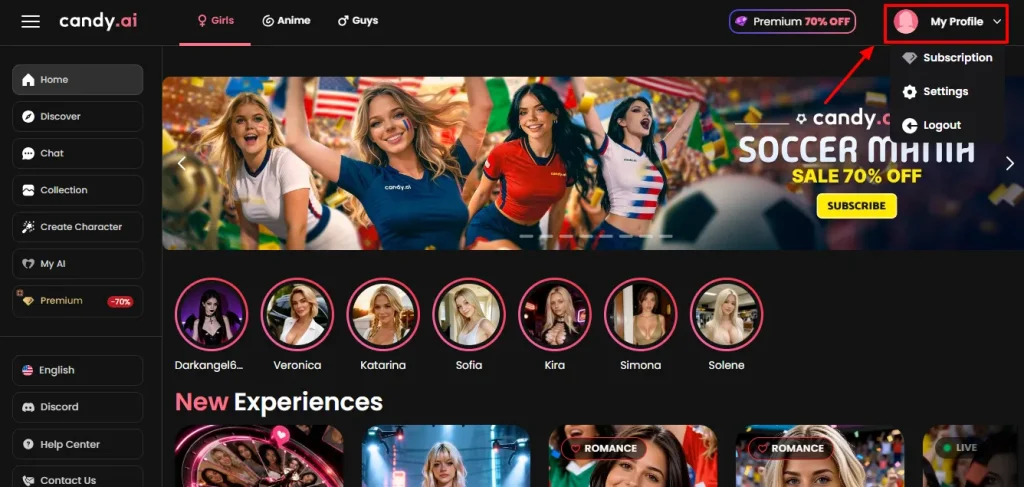
- Open Candy AI and go to your Profile
- Scroll down to Current Plan
- Click Unsubscribe
- Confirm when prompted
You keep premium until the billing cycle ends, then you drop back to the free plan. Heads up: cancelling the sub doesn't refund leftover tokens, so spend 'em first.
Muah AI
Muah AI (owned by USWX Inc) is the uncensored heavyweight, but it's had documented data breaches, so plenty of users want out sharpish.
- Open the Muah.ai app or website
- Tap your profile icon to reach Account settings
- Select My Subscriptions
- Click View next to your active sub
- Tap the Cancel button
- Confirm
No verification calls, no waiting period. Premium runs till your period ends.
SpicyChat AI
SpicyChat (NextDay AI, Montreal) is a fan favourite for roleplay and it's refreshingly painless to cancel.
- Log into your SpicyChat AI account
- Go to the Subscribe section in your account menu
- Click Manage Subscription
- Select Cancel membership
- Confirm
Done in under a minute. No begging from customer service.
OurDream AI
OurDream AI (run by Dream Studio LLC out of Albuquerque) bills as Dream Studio, and ditching it is dead simple:
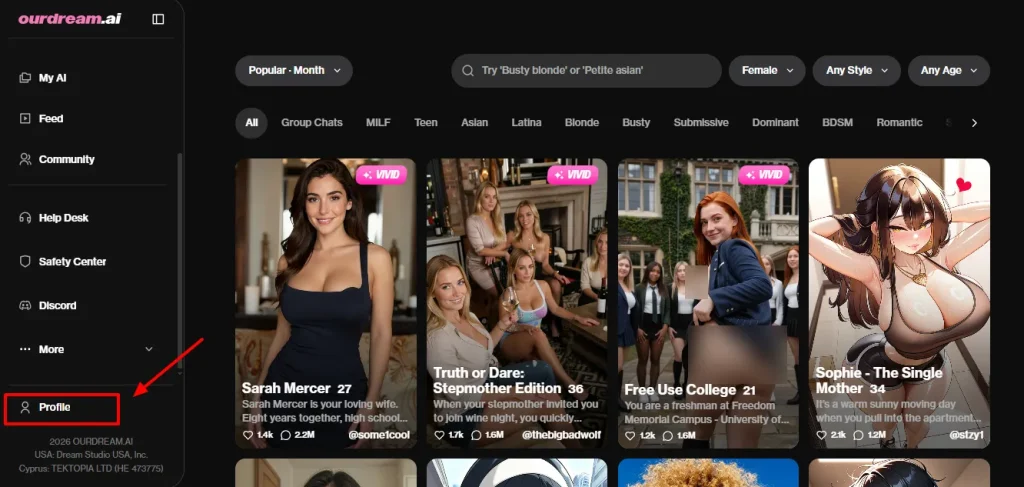
- Tap on your Profile in the app
- Look for Current Plan at the top
- Hit Cancel Plan
- Confirm when it asks
No phone calls, no customer service hassle, the cancellation goes through right away. Remember, your unused DreamCoins don't refund, so burn through them before you bail.
GoLove AI
GoLove AI is a newer NSFW companion app, and like most of the pack it keeps cancellation tucked inside your account settings:
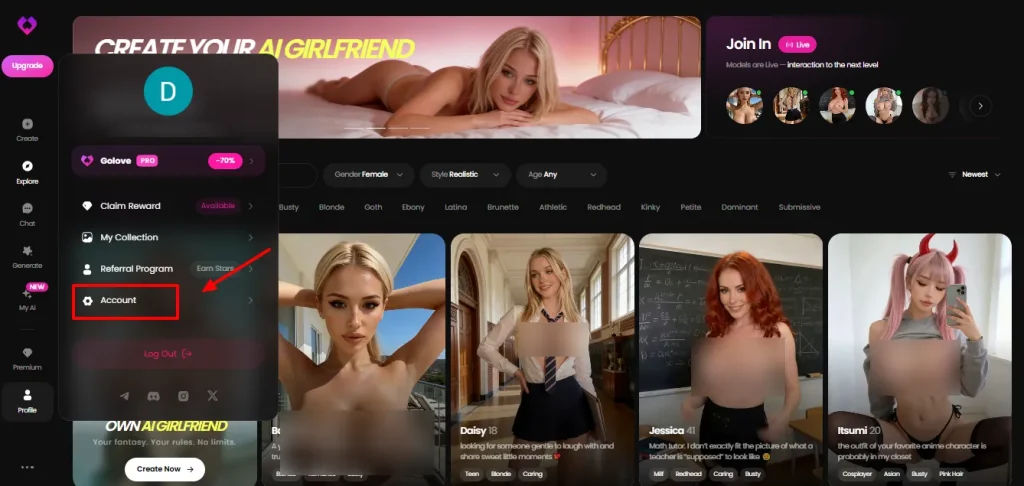
- Log into your GoLove AI account on the website or app
- Open your Profile or Account Settings
- Find the Subscription or Billing section
- Click Cancel Subscription / Unsubscribe
- Confirm when prompted
If you originally subscribed through the App Store or Google Play, you'll need to cancel there instead (see below). As always, premium access ticks along until your current cycle wraps up.
⚙ The Settings-Menu Crowd (DreamGF, GirlfriendGPT, Kupid AI, HeraHaven, Lovescape, Nomi)
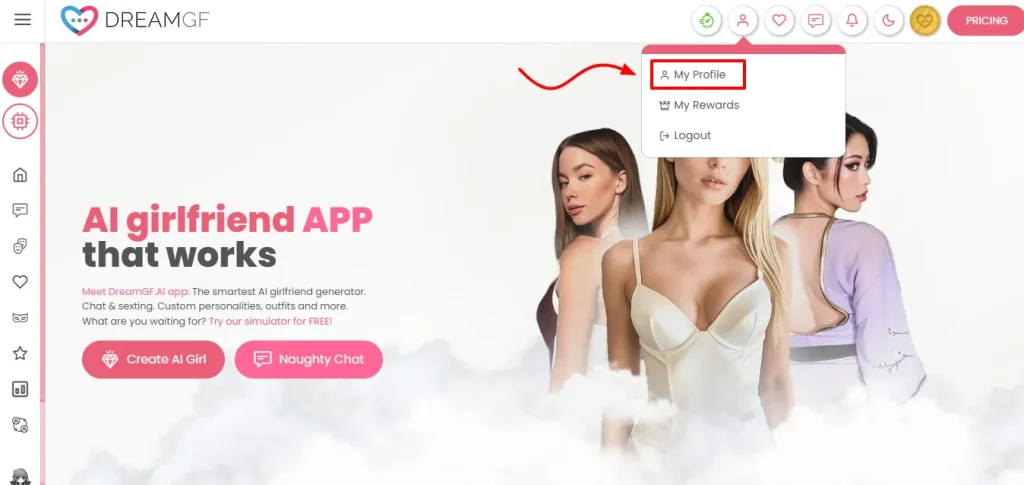
Loads of other AI companion apps follow the same basic pattern. If yours isn't listed above, this works nine times out of ten:
DreamGF bills as “Dream Ai”, Kupid AI shows as “Kupid”, and GirlfriendGPT sneaks through as “xp ndai.cc”. Knowing your billing descriptor helps you spot the charge you're trying to stop.
🛍️ Cancelling Through App Stores (iPhone & Android)
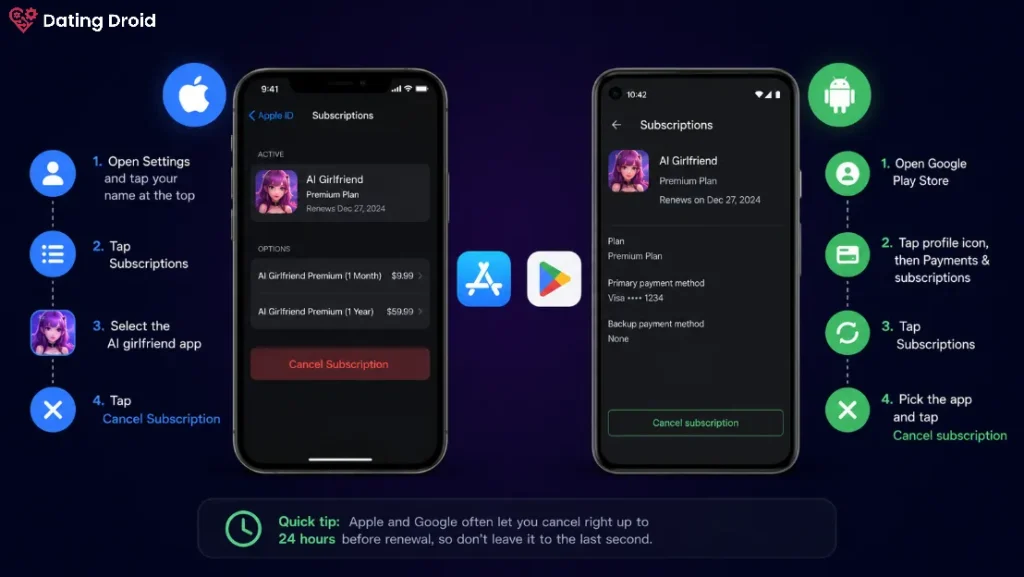
If you subscribed via a mobile app, the in-app “cancel” button might not work, you've got to go through the store.
On iPhone (Apple App Store):
On Android (Google Play):
Quick tip: Apple and Google often let you cancel right up to 24 hours before renewal, so don't leave it to the last second.
🆚 Cancelling vs Deleting Your Account: Big Difference
This trips up tons of users, so listen up. Cancelling stops the recurring payment but leaves your account, chat history, and custom characters sitting there. Deleting nukes the lot, forever.
| Action | What happens | Can you undo it? |
|---|---|---|
| Cancel subscription | Billing stops; you drop to free tier; data stays | Yes, just resubscribe |
| Delete account | Chats, images, custom AI girlfriends wiped permanently | No, gone for good |
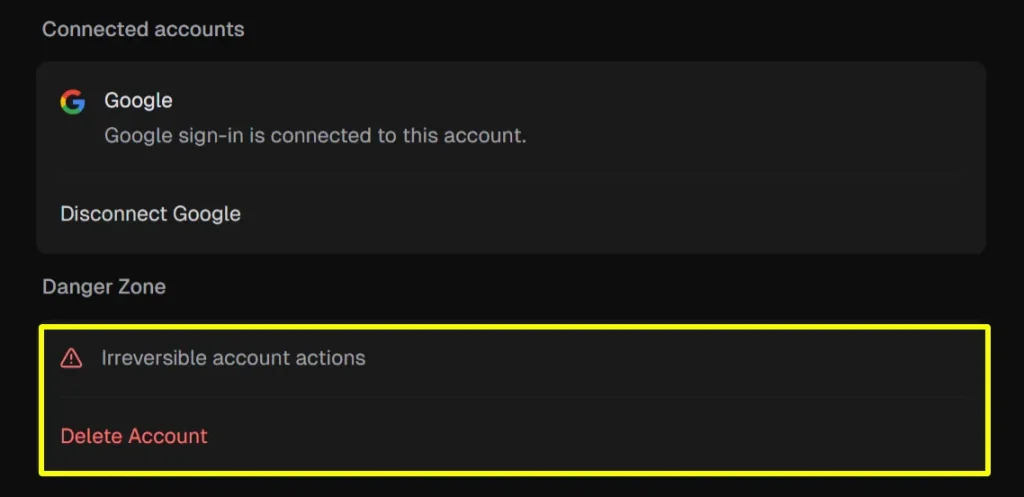
On Candy AI, account deletion lives in the Profile under the cheekily-named “Danger Zone”, and OurDream AI uses the exact same “Danger Zone” tag for its Delete Account button.
On Muah AI, look for Delete Account at the bottom of your Companion Settings. If you've got steamy NSFW logs you'd rather not leave on their servers, deleting is the privacy-conscious move.
🤔 How to Avoid Getting Charged After You Cancel
A few golden rules so no sneaky charges slip through:
If you cancelled but still got billed, contact the platform's support with your screenshot, or raise a dispute with your bank or card provider.
🎯 FAQs: Cancelling AI Girlfriend Subscriptions
Will I get a refund when I cancel my AI girlfriend subscription?
Usually not. Most AI companion apps let you keep premium until your cycle ends but don't refund unused time or leftover tokens. Always check the platform's billing terms before you buy.
Do I lose my chats and custom characters when I cancel?
No. Cancelling just stops billing, your AI girlfriend, chat history, and custom characters stay put. You only lose everything if you fully delete your account.
Why am I still being charged after cancelling?
Almost always because you cancelled in the wrong place. If you subscribed through the Apple App Store or Google Play, you must cancel there, not inside the app's own settings.
Is cancelling an AI girlfriend app discreet?
Yep. The cancellation itself is private, and most apps use sneaky billing names (Everai for Candy AI, Blue Light for Muah, Dream Studio for OurDream AI) so nothing embarrassing pops up on your statement.
Can I cancel and resubscribe later?
Absolutely. Cancelling doesn't ban you. As long as you didn't delete your account, you can come crawling back to your virtual girlfriend whenever the mood strikes.
How long does cancellation take to process?
Most platforms process it instantly. You'll see a confirmation, and premium access ticks along until your current billing period runs out.
📌 Final Word: Cut the Cord Without the Hassle
Ditching a virtual companion shouldn't feel like defusing a bomb. For nearly every NSFW AI girlfriend app, the play is the same: dig into your profile or billing settings, hit cancel or unsubscribe, and confirm.
The only real gotcha is remembering to cancel AI girlfriend subscriptions through the same channel you signed up with, be that the website, the App Store, or Google Play. Sort that, keep an eye on your billing descriptor, and you'll walk away clean with no ghost charges haunting your card.
And hey, if you're only leaving because your current AI sexting app got stale, there's a whole world of better-value companions waiting, your wallet just deserves a breather first.

Stay Updated with Us