
How to Use Soulgen AI: Anime & AI Girls Guide (2026)

Quick Verdict: To use Soulgen AI, create an account at Soulgen.ai, choose Real, Anime, DreamTwin, or Human Modelling, write a detailed prompt, select an aspect ratio, and click Generate. Images usually appear within seconds, and no design software or technical experience is required.
For better results, describe the character’s appearance, clothing, pose, expression, lighting, and background instead of using a vague one-line prompt. DreamTwin and the Looks Like feature can also help maintain a similar face across multiple images.
Soulgen AI is best suited for creating anime girls, realistic AI characters, virtual companions, fictional personas, and short character videos. The free version is useful for testing the platform, while paid plans provide additional credits and access to more advanced creation tools.
This guide explains how to use Soulgen AI step by step, with prompt examples, editing workflows, consistency tips, and ways to avoid wasting credits.
❤ What Is Soulgen AI?
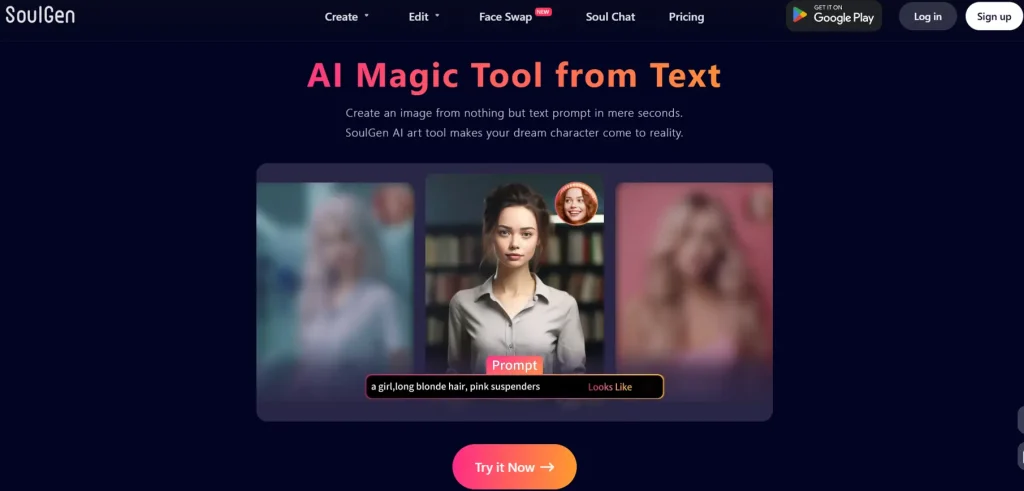
Soulgen AI is a web-based text-to-image and video generator built specifically around character creation. Type a description, pick a style, and you've got a finished portrait in seconds.
But it's grown into something considerably bigger than that. In 2026, Soulgen handles AI image generation, video creation, image editing, outpainting, face-matching, lip sync, and an AI companion chat feature called Soul Chat, all inside one browser-based platform.
For anyone in the AI dating, virtual companion, or character creation space, Soulgen sits in an interesting spot. It's the visual engine that brings your characters to life. Think of it less as an image generator and more as a creative studio for building the AI companions you actually want to see.
🧐 Who Is Soulgen Actually For?
Worth Knowing: Soulgen isn't just for digital artists. The platform has quietly become a go-to tool for:
If you've been using AI relationship apps and thought, “I wish I could actually design what my AI companion looks like”, Soulgen is built for that.
🔏 Getting Started: Setup in Under 2 Minutes
No software downloads. No GPU. Just a browser and an account.
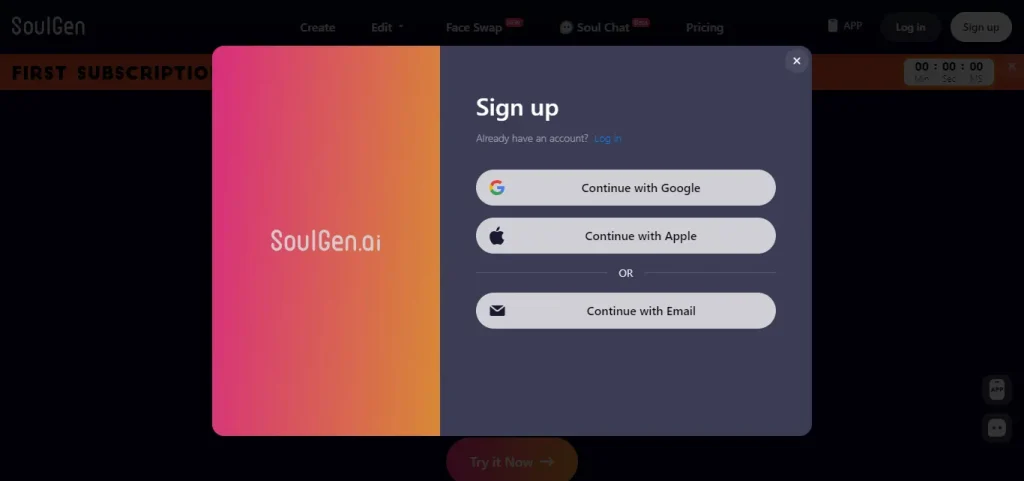
- Visit soulgen.ai; the entire platform runs in your browser
- Sign up, email or Google login, takes 30 seconds
- Verify your age — Soulgen is strictly 18+
- Choose a creation mode; more on those in the next section
- Start creating, the interface is genuinely clean and beginner-friendly
Beginner Mistake: New users often judge Soulgen from the free tier and walk away underwhelmed. The free plan is a taster menu, not a full meal. Try Pro credits before forming an opinion.
👉 The Four Creation Modes: Which One Do You Need?
| Mode | Best For | Cost |
|---|---|---|
| Real Character | Photorealistic AI girlfriend visuals, dating-style portraits | 1 credit / image |
| Anime Character | Anime companions, manga-style art, fantasy characters | 1 credit / image |
| DreamTwin | Building a consistent character identity used repeatedly | 1 credit / image |
| Human Modelling | Upload a real face, place it into any scene | 3 credits / image |
Add the “Looks Like” option to any mode and you pay 2 credits per image instead of 1. That's the feature that matches your character's face to a reference photo.
Quick Tip: If you're building an ongoing AI companion or recurring fictional character, start with DreamTwin, it's designed specifically to hold identity consistency across multiple generations.
🎨 Creating Your First AI Character: Step by Step
Step 1 — Choose Real or Anime
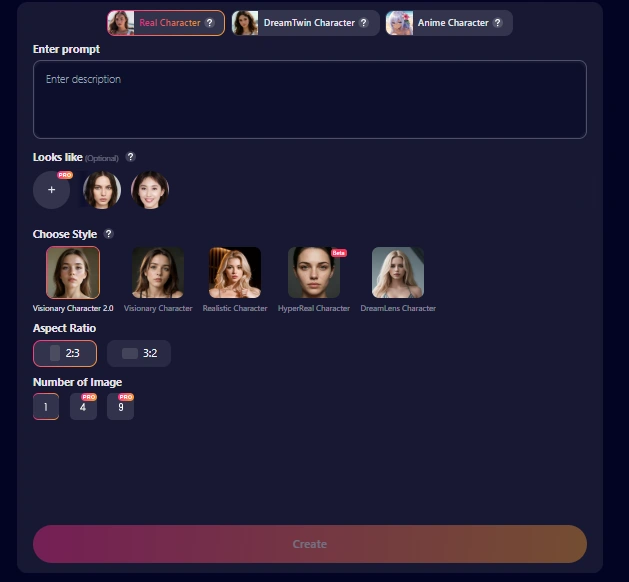
This is your biggest style decision. Anime mode produces illustrated characters — soft lines, vibrant colours, exaggerated expressiveness. Real mode produces photorealistic portraits — lighting, texture, skin detail, cinematic feel.
Neither is objectively better. They serve different creative intentions. A romantic anime girlfriend concept calls for anime mode. A realistic AI companion portrait feels more grounded in real mode.
Step 2 — Write a Prompt That Actually Works
This is where most beginners quietly fail. A weak prompt gives a weak result.
Beginner Mistake: Writing just “pretty anime girl” and wondering why the output feels generic. You've given the AI nothing to work with.
Structure your prompts like this:
[Subject] + [Appearance] + [Clothing] + [Expression] + [Setting] + [Lighting] + [Style/Mood]
Real Prompt Examples (With Explanations)
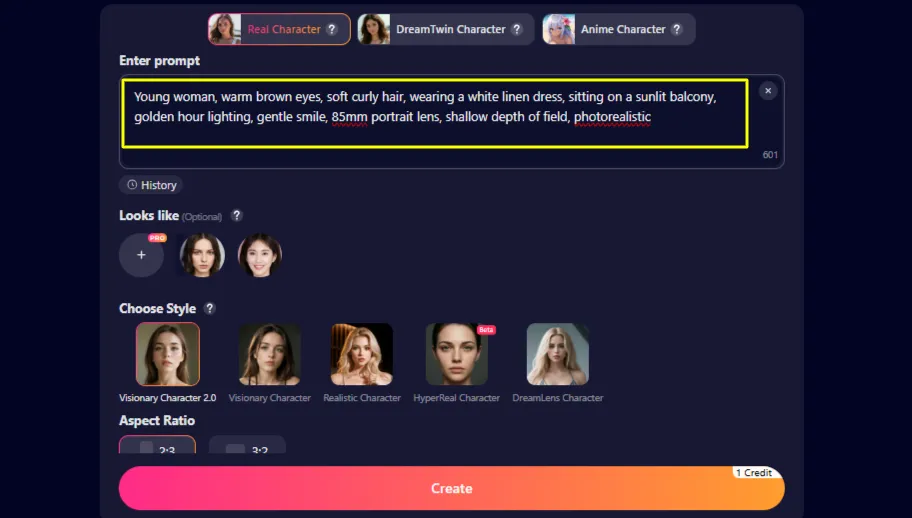
Romantic Realistic Portrait:
Young woman, warm brown eyes, soft curly hair, wearing a white linen dress, sitting on a sunlit balcony, golden hour lighting, gentle smile, 85mm portrait lens, shallow depth of field, photorealisticWhy it works: Every element — lighting, lens, mood, clothing, expression — is specified. The model has creative direction, not creative freedom.
Anime Companion (Soft Romance Style):
Anime girl, bright violet eyes, long pastel pink hair with ribbon, wearing a cosy school cardigan, sitting by a rainy window, warm indoor light, soft smile, gentle expression, Studio Ghibli-inspired aesthetic, high detailWhy it works: The style reference (Studio Ghibli-inspired) pushes the model toward a specific aesthetic. The emotional framing — rainy window, gentle expression — gives the character warmth and personality.
Fantasy Anime Companion:
Anime warrior girl, silver braided hair, pale gold armour with floral engravings, standing at the edge of a cliff at dusk, glowing moon behind her, fierce and determined expression, dramatic rim lighting, detailed illustration, vibrantCyberpunk Anime Girl:
Anime character, neon-blue bob haircut, cyberpunk city backdrop, rain-slicked streets, holographic billboards in background, half-smile, sharp eyes, futuristic jacket, night lighting with neon glow, cinematic angleCasual Dating-Style Realistic Portrait:
Young woman, natural makeup, freckles, loose oversized denim jacket, laughing naturally, street photography, autumn afternoon, warm sunlight, candid style, 50mm lens, photorealisticWhy it works: This reads like a genuine dating profile shot, approachable, natural, warm. Great for AI companion creators who want a grounded, relatable character feel.
Step 3 — Set Your Aspect Ratio
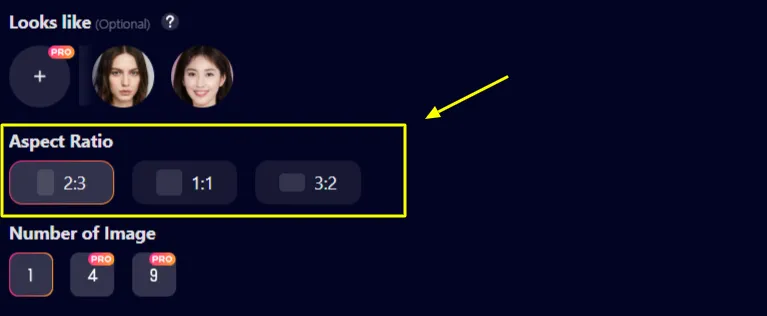
Step 4 — Generate 4 Images, Not 1
Pro Tip: Always generate 4 images per batch, not a single image on repeat. You get more visual variation for the same credit investment, and one of those four will almost always be stronger than anything you'd produce by rerolling one image multiple times.
👀 SoulGen AI Auto Enhance, Friend or Foe?
Auto Enhance expands your prompt automatically before generation. It's genuinely useful when your prompt is short or vague.
Use it when: you've written a brief prompt and want the AI to flesh it out.
Leave it off when: you've written a detailed, intentional prompt. Auto Enhance can override specific instructions you've already written, pulling the character in a different direction than you wanted.
Expert Advice: Write your own detailed prompt first. Disable Auto Enhance. Stay in control of your character's identity.
❌ Negative Prompts: The Feature Most People Skip
Negative prompts tell Soulgen what not to include. They're available in Classic Edit and Reference-to-Video workflows, and they significantly clean up outputs.
Useful negative prompts for character creation:
Don't Skip This: Negative prompts are the fastest, cheapest way to improve output quality without burning extra credits.
🎭 Character Consistency: The Feature That Makes or Breaks AI Companion Projects
This is the most common question from people creating ongoing AI companions or fictional partners, “How do I keep my character looking the same?”
Reality Check: Perfect consistency across AI-generated images is genuinely hard. Soulgen gives you better tools than most platforms, but don't expect pixel-perfect clones every session.
Your Consistency Toolkit
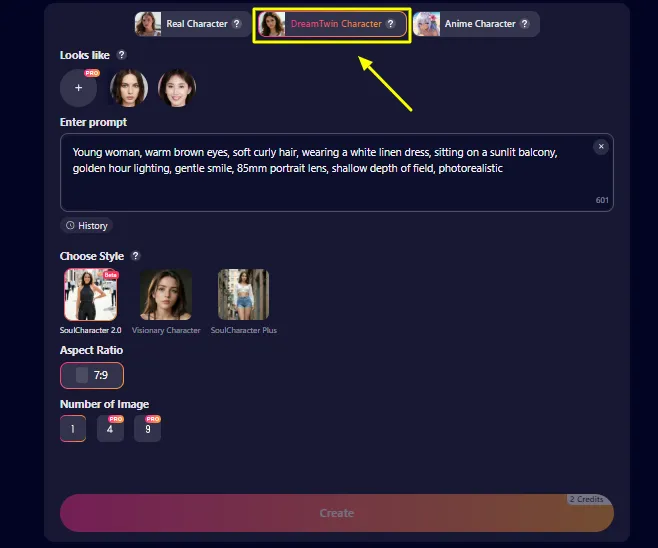
DreamTwin is Soulgen's dedicated consistency mode. Define your character via prompt, upload a reference face, and DreamTwin tries to hold that identity across multiple generations. It's the most reliable method on the platform for creators building long-term AI companions or recurring fictional partners.
Looks Like uploads a reference photo and matches your character's face to it. Good for general facial similarity. Less precise than DreamTwin but faster for quick iterations.
Human Modelling takes a clear uploaded face and places it into new scenes. The better the reference photo quality, the better the result. Blurry or angled photos will produce weaker outputs.
Image History lets you reuse previous generations as starting references. Build the habit: save your strongest outputs externally, then reference them consistently in future prompts.
Consistency Tips That Actually Help
👀 The “Looks Like” Feature: Responsible Use
The Looks Like function matches generated characters to an uploaded reference photo. It's genuinely useful, and easily misused.
Use it for:
Never use it for:
Soulgen's Terms of Service prohibit impersonating real identities. Beyond legality, it's just not a good look.
🖼 Image Editing: Fix Instead of Regenerate
Learning to edit is one of the best credit-saving habits you can build. A generated image that's 80% right is often fixable with editing, rather than a full regeneration.
Smart Edit
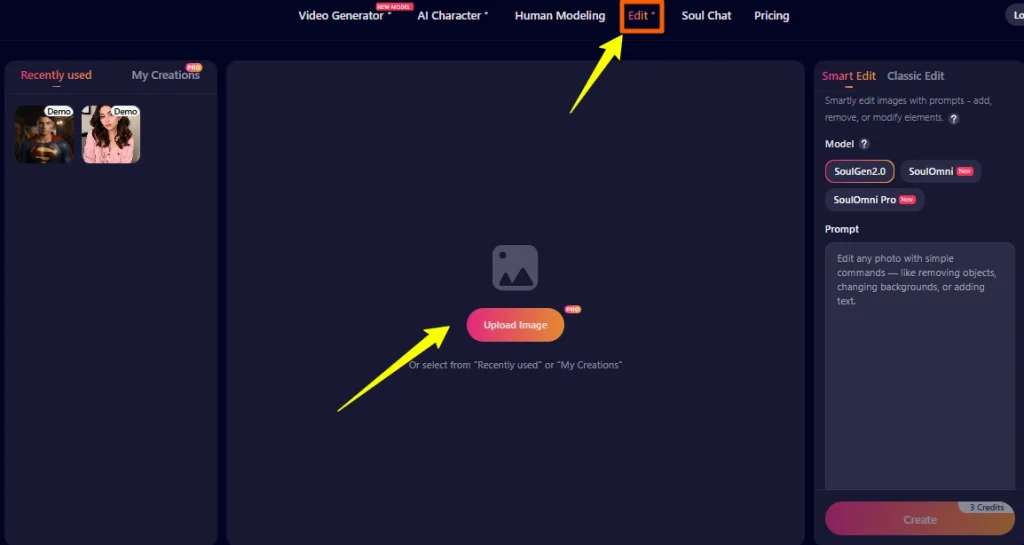
Type what you want changed in plain English, “swap the background to a moonlit forest”, “change her jacket to burgundy”, “add a floral hair clip.” The model handles it.
Best for: simple changes, backgrounds, clothing colour, accessories, expressions.
Cost: 3 credits per image (SoulGen 2.0).
Classic Edit
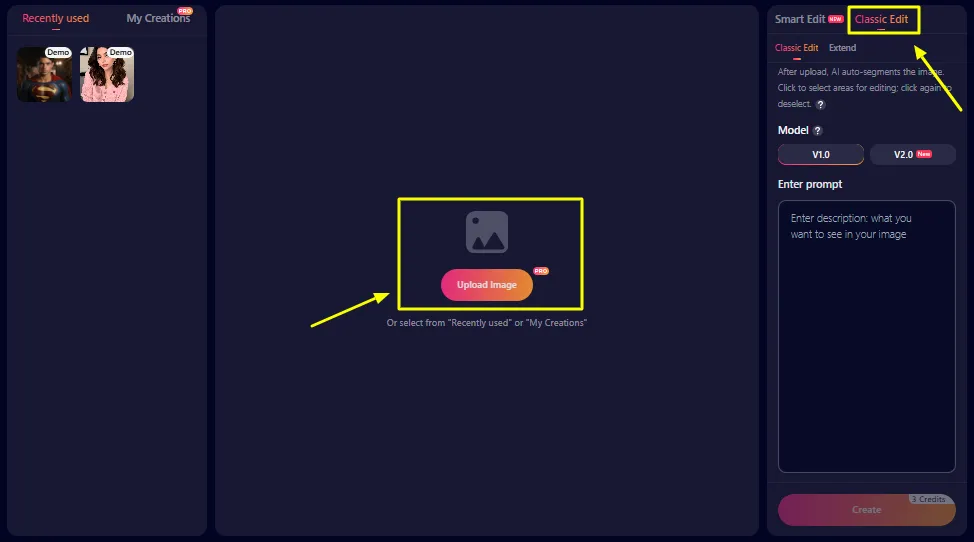
The AI segments your image into clickable regions. You select a specific area, type what you want changed, and only that area is edited.
Best for: surgical fixes — adjusting just the face, fixing one character's outfit, changing lighting on a specific element without touching everything else.
Cost: 3 credits per image.
Pro Tip: Use Classic Edit when Smart Edit keeps affecting areas you didn't ask it to touch. The precision is worth the extra steps.
Outpainting (Extend)
Expand your image beyond its original canvas. Resize the frame, add a text prompt for what should fill the new space, and the AI generates it.
Best use case: You've generated a tight portrait of your anime companion but now want a wider scene — a café background, a park setting, a bedroom environment. Outpainting extends the scene rather than regenerating from scratch.
💪 Building a Full AI Companion: The Complete SoulGen AI Workflow
Here's the workflow pattern that produces the best results for character-focused creators:
- Start with DreamTwin — define your character's core visual identity
- Generate a batch of 4 in portrait mode (2:3 ratio)
- Select the strongest result as your “canonical” reference image
- Use Classic Edit to fix anything specific — expression, clothing, minor details
- Save your reference externally
- Bring the character into Soul Chat to build personality alongside visuals
- Animate your favourite image using Image-to-Video when you want motion
That's a complete AI companion creation workflow — from concept to moving, interactive character.
🎬 Video Generation: Bringing Your SoulGen Characters to Life
Soulgen's video tools have matured significantly. For creators who want their characters to actually move, this section matters.
Image-to-Video (Most Useful for Character Creators)
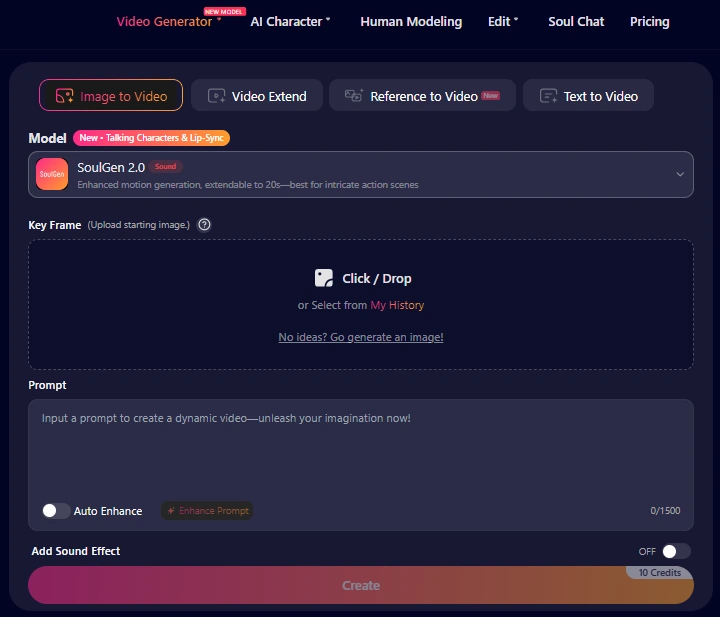
Take your best generated character image and animate it. Write a simple motion prompt — what should move and how.
Effective motion prompts:
Cost: 10 credits per 5 seconds (SoulGen 2.0, audio off).
Best for: Bringing a specific companion character to life. Because you've defined the visual starting point, results are far more controlled than text-to-video.
Text-to-Video
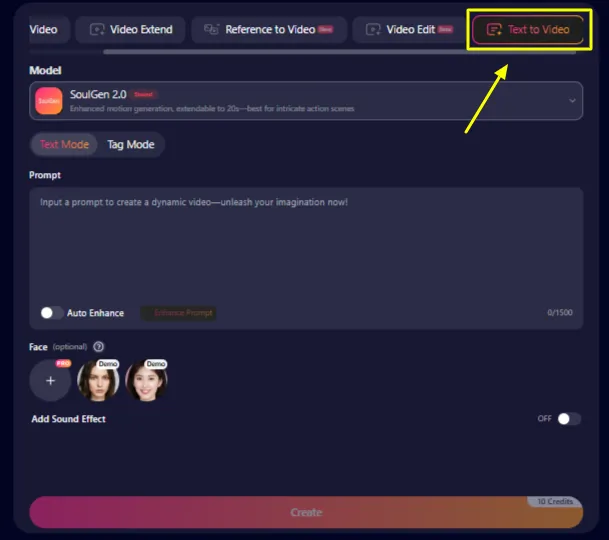
Describe a scene from scratch and the model generates it. Better for environmental and atmospheric clips than for precise character control.
Same credit cost as image-to-video. Results are more variable.
Reference-to-Video
Upload 1–5 reference images or videos. The model extracts appearance, motion style, background, and voice characteristics from your references to produce a new clip.
This is the most powerful tool for consistent character videos. Upload your reference shots from DreamTwin and the video stays closer to your established character identity.
Cost: 720p — 20 credits per 5 seconds. 1080p — 26 credits per 5 seconds.
Lip Sync
Add dialogue and watch your character's mouth sync to it. Combined with a strong character portrait, this produces the most personal AI companion experience Soulgen offers — short of actually chatting in Soul Chat.
Cost: Add +2 credits per 5 seconds for audio re-addition.
Video Realities to Know
Worth Knowing: Videos up to 20 seconds are supported. Simple motion, gentle head turns, hair movement, environmental motion, looks natural. Complex action or rapid movement can produce inconsistent results. For character-focused romantic AI artwork or companion content, keep movements subtle for the cleanest output.
💬 Soul Chat: Your AI Companion in Conversation
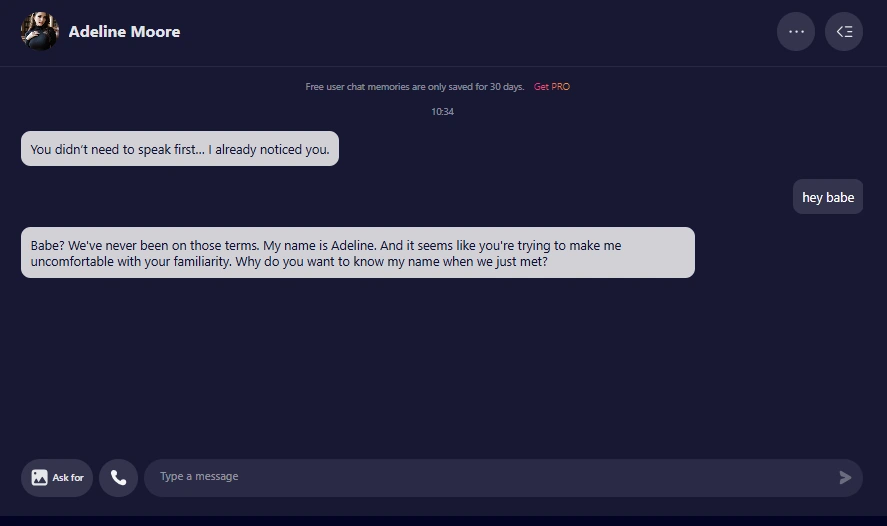
Soul Chat is where Soulgen moves from visual art generator into proper AI relationship app territory. You build a custom AI persona — appearance, personality traits, backstory — and then chat with it via text or voice.
Creating a Soulmate costs 10 credits. Once created, you can chat via text (0.2 credits/message), exchange in-chat images (2 credits each), or make voice calls (1 credit/minute).
The experience works best when you've already established your character visually in the image generator, then bring that character into Soul Chat. The combination of visual identity + conversational personality is what makes the AI companion feel cohesive.
Users note the chat adapts tone well — it mirrors your energy and adjusts across roleplay scenarios, flirty exchanges, or more emotional conversations.
Reality Check: Soul Chat is engaging for short to medium sessions. Extended conversations can feel slightly repetitive if you're not actively steering the narrative. Guide the chat — give your companion a scenario, a mood, a setting — rather than waiting for the AI to carry it.
💡 SoulGen AI Credit System: Know Before You Spend
The credit system is where many users feel blindsided. Here's the full breakdown so you're not guessing.
| Feature | Credit Cost |
|---|---|
| AI Character (no Looks Like) | 1 credit / image |
| AI Character (with Looks Like) | 2 credits / image |
| Human Modelling | 3 credits / image |
| Smart Edit (SoulGen 2.0) | 4 credits / image |
| Classic Edit | 3 credits / image |
| SoulGen 2.0 Video (audio off) | 10 credits / 5s |
| SoulGen 2.0 Video (audio on) | 12 credits / 5s |
| SoulOmni Video 720p | 18 credits / 5s |
| SoulOmni Video 1080p | 24 credits / 5s |
| Reference-to-Video 720p | 20 credits / 5s |
| Reference-to-Video 1080p | 26 credits / 5s |
| Soul Chat (text) | 0.2 credits / message |
| Soul Chat (voice call) | 1 credit / min |
| Create a Soulmate | 10 credits |
🤑 How Beginners Accidentally Drain Credits
💰 Pricing: What You Get
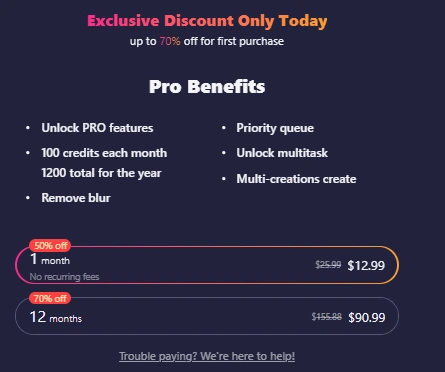
| Plan | Monthly Cost | Credits | Perks |
|---|---|---|---|
| Free | $0 | Very limited | Platform preview only |
| 1 Month Pro | $12.99 (up to 50% off first purchase) | 100 credits | Priority queue, blur removal, multitask |
| 12 Month Pro | $90.99 total (up to 70% off first purchase) | 1,200 credits (100/month) | Best value overall |
Worth Knowing: Pro removes the blur applied to free-tier outputs, unlocks simultaneous multi-generation (multitask), and places you in a priority generation queue — noticeably faster during peak times.
Is Pro worth it? For someone casually experimenting — maybe not immediately. For anyone building an ongoing AI companion, creating consistent character content, or regularly using video — 100 credits will disappear faster than you'd expect. The annual plan at roughly $7.58/month equivalent makes much more sense than month-to-month if you plan to stay.
⚡ Things I Wish Beginners Knew Before Using Soulgen
These aren't obvious from the homepage. They come from real user patterns and practical use:
✨ 7 Tips That Instantly Improve Your Results
Name the lighting specifically — “golden hour”, “dramatic side light”, “cool blue neon” changes the entire emotional tone
Add a camera angle — “eye level”, “slightly from below”, “three-quarter view” changes how powerful the composition feels
Describe the environment in detail — “cosy rain-lit café booth” beats “café background” every time
Use emotional descriptors — “wistful expression”, “quiet confidence”, “caught mid-laugh” makes characters feel alive
Reference an art style — “Studio Ghibli-inspired”, “cel-shaded”, “cinematic photography” anchors the aesthetic
Detail the clothing — vague clothing produces generic outputs; specific clothing produces character
Iterate from your best image — use Smart Edit on a strong output rather than regenerating from scratch)
✒ Common Prompt Mistakes (And How to Fix Them)
Stacking generic compliments — “beautiful stunning gorgeous flawless perfect” adds nothing actionable. Pick one or two meaningful descriptors.
Vague settings — “nice background” tells the AI almost nothing. “Sun-drenched Tokyo rooftop at twilight” is a real creative instruction.
Forgetting the mood — lighting is mood. “Dramatic side lighting” and “soft diffused morning light” produce entirely different emotional readings of the same character.
Contradicting yourself — “soft watercolour anime, hyper-realistic 8K photography” will confuse the model. Pick a lane.
Skipping aspect ratio — a portrait-framed prompt generated in landscape ratio will crop awkwardly. Match your ratio to your composition.
⚠️ Honest Limitations
Soulgen deserves honest criticism as much as genuine praise. Here's what to expect:
None of these are dealbreakers, but they're worth knowing before you invest.
🛡 Commercial Use and Copyright: The Basics
Can you use Soulgen images commercially? Pro subscribers have broader usage rights. Always check Soulgen's current Terms of Service — platform policies update, and what's true today may have changed by the time you read this.
Are AI-generated images copyrighted? Legally unsettled territory globally in 2026. In most jurisdictions, AI-generated images without substantial human creative input don't qualify for traditional copyright protection.
Practical guidance:
📌 Is Soulgen AI Worth It? The Honest Verdict
Soulgen is worth paying for if you're genuinely building something — a consistent AI companion identity, an ongoing character for roleplay or storytelling, a series of character portraits, or regular AI dating content. The combination of image generation, video, editing, and Soul Chat inside one platform is genuinely useful for that use case.
It's less compelling for purely text-based AI companion experiences — other platforms specialise there and do it better. It's also not the right fit for someone who wants one or two images occasionally; the credit structure rewards frequent use.
The first-purchase discount (up to 70% off) makes the annual plan genuinely affordable as a creative tool. Try the monthly Pro plan for a full 30 days, push every feature hard, and let your actual output quality decide whether the annual commitment is worth it.
For AI companion fans who want their virtual partner to have a real face, a consistent identity, an animated presence, and a voice, Soulgen is currently one of the most complete tools for building exactly that.

Stay Updated with Us